Showing posts with label Cameras. Show all posts

Sunday, 22 May 2016

Parrot Bebop Drone 2

Parrot Bebop Drone 2 review:

Better than the original, but still shy of greatness

Parrot Bebop Drone 2
THE GOOD: The Parrot Bebop Drone 2 is small enough to stick in your average backpack, but sturdier than the original with about twice the battery life. Its propellers stop the instant they're obstructed, easy barrel rolls and flips and new banked turns capability makes it more fun to fly, and it's stable indoors or outside. It can be piloted with third-party Bluetooth controllers.
THE BAD: It's pricey when bundled with the massive Skycontroller remote control, and its video quality hasn't improved much from the first-gen Bebop. In-app purchases are required for features other drone makers include. Its control range is dependent on your mobile device and flight conditions. It's limited to 8GB of internal storage for photos and video.
THE BOTTOM LINE: The Parrot Bebop 2 definitely improves on the original and remains a good choice for its portability and safer design, but stiffer competition and merely good image quality limit its overall appeal.
Maybe it's the design, or its size and weight, or that you're just as likely to find it sold as a phone accessory as you are in a toy store or camera department of a big-box retailer, but Parrot's Bebop 2 is one of the least intimidating camera drones you'll find. Even less so than most toy drones, since it takes off and lands on its own and has no trouble hovering in place indoors or outside.
The fact that it's controlled with a phone or tablet certainly helps. Flying by touchscreen isn't the best experience, but honestly handing someone a regular remote control for the first time arguably isn't any better. Instead of sticks and switches and buttons, you're tapping on a screen and sliding your thumbs around or simply tilting your phone in the direction you want it to fly. The mobile app is free, but you can make a $20 in-app purchase to unlock more advanced flight-plan capabilities, letting you set waypoints for the Bebop 2 to follow among other things.
The quadcopter is small enough to slide into an average backpack and at just over a pound (500 grams), it's easy to travel with. Aside from the propellers there are no moving parts, which helps its chances of surviving a crash. The ABS body is reinforced with glass fiber to toughen it up even more. It's also one of the safest drones you'll find with flexible plastic propellers that stop the second something hits them.
The Bebop 2 is primarily flown with a smartphone or tablet.

Because of these things, the Bebop 2 perhaps comes off as more of a toy and less of a serious camera drone like the DJI Phantom 3 Standard, which currently shares the Bebop 2's $500 price tag. (The Bebop sells for AU$900 in Australia and £440 in the UK, while the DJI is AU$859 and £449.) And frankly, if high-quality aerial photos and video are what's most important, you're better off with the Phantom 3 Standard. (Similar flight plan capabilities to the Bebop's don't cost more with the Standard, either.)
Consider the Bebop 2 if you want something more family-friendly. One that you won't panic as much about when you turn over the controls to a friend for their first time flying. A camera drone that can get decent video and photos for sharing, but also survive crashes and do flips with a couple taps on screen.
The Bebop 2 is piloted with a smartphone or tablet, but just how far depends on the conditions.

I actually tested two different Bebop 2s. The first was a preproduction unit that, like the original Bebop I reviewed, occasionally dropped its wireless signal in flight. Not really something you want to have happen when it's hundreds of feet in the air or out over a body of water. Parrot said this was a fault in the early models and not a typical experience.

To confirm this, I tested a second unit and, in fact, did not experience any dropouts while testing it. That may have been because of its newer firmware, or there was something actually wrong with the first drone, or maybe both. All I know is the second Bebop 2 I tested performed just fine.
Parrot claims it's possible to fly the Bebop 2 up to 300 meters away (about 985 feet) using a mobile device. That's an average, too, so it can potentially go even further or fall short of that mark. The distance is going to vary depending on everything from trees and buildings to other wireless signal traffic to the device you're using. Even how you hold the device can determine signal quality.
That in mind, I tested using the latest firmware installed (version 3.2.0) with an iPad Air 2 in an open field surrounded by trees in a heavily populated area (i.e. with a lot of wireless signals) and was able to get it out to more than 200 meters before the video cut out. Could it have flown farther? Probably, and I might have even gotten the video feed back. But I played it safe and called it back using the automatic Return to Home option. The point is, how far you'll be able to fly the Bebop 2 is dependent on your environment and your device.
Parrot's Skycontroller increases the Bebop's flight range, but also empties your wallet.

For the best range and physical controls, you can spend a couple hundred dollars more for Parrot's huge and awkward Skycontroller. It has full controls for the drone and an amplified Wi-Fi radio on top allowing you to fly up to 1.2 miles (2 kilometers), assuming conditions are absolutely perfect. The FreeFlight mobile app is installed on it though, so you don't need to pair it with a mobile device to fly. It also has a full-size HDMI output on the side lets you connect an external display to see what the camera sees and also supports headsets for completely immersing you for first-person-view (FPV) flight.
The Skycontroller isn't your only option for physical controls, though. You can pick up a Bluetooth gaming controller and use that to pilot via your tablet or phone. Parrot has a tutorial on how to set it up and some suggested controllers.
The Bebop 2's camera is essentially the same as the original's, which wasn't great.

Though its camera has a new design for its lens covering making it dust-proof and a wider aperture, it is otherwise unchanged, featuring a 14-megapixel sensor with a wide-angle lens that covers a 180-degree field of view. That is, for me, what's most disappointing about the Bebop 2.
For capturing cool video from the sky for sharing online or viewing at small sizes on a phone or tablet, you'll probably be pretty happy with what you get from the Bebop 2, especially if you're flying in full daylight. Compared to the DJI Phantom 3 Standard, though, it misses the mark.
Instead of the motorized gimbals found on many other camera drones, the Bebop 2 uses three-axis digital stabilization for smooth video results. It works really well, all things considered, eliminating shake. Parrot also handles panning and tilting digitally allowing you to "move" the camera without it actually moving. It's clever, but it's done by using only certain areas of the sensor and lens, so you can end up with a black area from the fish-eye lens as well as rolling shutter artifacts. If you stick to using the center of the lens and avoiding the extreme corners, this isn't an issue.
Parrot BEBOP 2

In the sample video above, you can see some of the tearing from the digital tilting, in addition to a lack of fine detail such as the mushy trees, and buildings and other structures just look painterly. There's edge crawl and aliasing artifacts, too.
Basically, while the video quality isn't fantastic, it's fine for casual use, which at the end of the day is what this quadcopter is for.
Everything gets stored to 8GB of internal flash storage and there's no microSD card slot for expansion. Getting photos and movie clips off the drone can be done either by slow wireless transfer to your mobile device, or by running a Micro-USB cable from the Bebop to a computer. It's a bit of a pain especially since you have to have the drone turned on the entire time.
Battery life is improved for the Bebop 2.

What did get fixed from the original is battery life, mainly because the body supports a larger pack. Gone is the flimsy connector and Velcro strap. Instead you get a 2,700 mAh battery that slides on back and locks into place. Parrot says it can get up to 25 minutes, but you can expect more like 20 minutes -- less if you're moving fast or doing flips. (By the way, the app lets you set maximum tilt for faster flying as well as maximum vertical speed and other flight parameters with simple sliders.)
Extra batteries (about $70 each) are available and should you damage a component, Parrot has madereplacement parts available -- from props to the camera to the GPS module -- for you to buy and install yourself. Even if you don't crash, you'll probably want to buy another battery or two and some extra propellers.
The Parrot Bebop 2 definitely improves on the original and remains a good choice for its portability and safer design, but stiffer competition and merely good image quality limit its overall appeal.

Yuneec Typhoon Q500 4K

Yuneec Typhoon Q500 4K review:

A very fine 4K camera for the ground and the sky

Yuneec Typhoon Q500 4K

THE GOOD The Yuneec Typhoon Q500 4K offers smooth, stable flight for grabbing photos and video from the air as well as the ground with its included handgrip. All-in-one controller with first-person-view screen and camera controls. Comes with two batteries, two sets of propellers and a storage case to hold everything. Very quiet compared to competing models. Can be used with Yuneec's ultracompact Wizard remote control.
THE BAD The Typhoon Q500 4K's size isn't travel-friendly. There's no support for waypoint navigation. The overall design could use some polish. Video quality is good, but best viewed at small sizes on tablets and phones.
THE BOTTOM LINE Thanks to some useful accessories and a solid feature set, the smooth-flying, easy-to-use Yuneec Typhoon Q500 4K quadcopter is a compelling package for video and photos in the sky or on the ground.

Camera  options for your average consumer drone are limited to either a mount for a GoPro or similar camera or a built-in camera that is permanently attached to the drone. The former is fine, though it may or may not give you a first-person view (FPV) from the air and it's one more thing to keep charged (and you'll have to figure in the extra cost of the camera). The latter, however, means you've got no upgrade path should a better camera come along, and it can only be used with the drone.
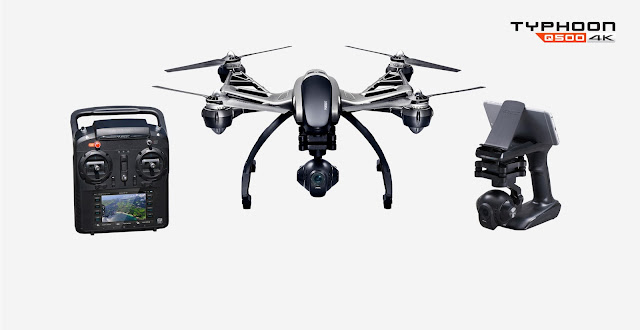
Yuneec's Typhoon Q500 4K is not your average drone. Slung from the belly of the $1,300 quadcopter (£960 AU$2,200) is a 4K-resolution camera combined with a three-axis antivibration gimbal. When not in the air, the camera-and-gimbal system can be quickly removed and attached to the included SteadyGrip, a battery-powered handheld mount that lets you use the Typhoon's camera on the ground. Combined with an iPhone or Android smartphone, you can shoot completely control the camera and see what you're shooting. (Yuneec makes an updated and improved version of the SteadyGrip calledActionCam with a built-in rechargeable battery and the Q500 4K's CGO3 camera.)
The DJI Inspire 1 series takes a similar approach, but it's targeted at professionals and starts at about $2,700 for the drone and the handheld camera mount is an additional $270. The Typhoon Q500 4K is a better option for beginners, giving you an aerial and ground imaging solution that, while maybe not as feature-filled as some competing models, does what it does very well.

Design and features

The Q500 4K is big. Not like "How does that thing get off the ground?" big, but next to the relatively compact DJI Phantom 3, it's big. (The diagonal motor-to-motor measurement is 390mm for the Phantom compared to the Typhoon's 510mm.) The size does make it easier to spot in the sky from a distance, but you're not sliding the Q500 4K easily into a backpack for a trip to the park.
Instead Yuneec packs everything into a large, sturdy case. Along with the drone and its camera you'll find two batteries and a charger; two sets of propellers; the ST10+ controller, a neck strap and sunshield; a cable to use the charger in a car; and the SteadyGrip handheld mount. Unfortunately, Yuneec used Styrofoam inside the case instead of something a bit more long-lasting.
The Styrofoam is representative of the design and build quality on the whole: it's a good package overall, but lacks some polish. The black-and-gray plastic body looks nice, but pick it up and it feels a little flimsy. It's great that the camera can be removed, but to do it you have to keep plugging and unplugging this small cable and pushing in a plastic tab, both of which I feel might not last with frequent use. Nothing that's a deal breaker, but a little disappointing.

The controller for me is definitely a plus, though. Instead of relying on a tablet or smartphone for a live view from the camera as well as flight information, the ST10+ has a built-in 5.5-inch touchscreen display built right in. There's a bit of lag between the camera and screen, so I wouldn't recommend flying by FPV alone, but for setting up shots and giving you telemetry data at a glance it's great. It also means you only have to worry about having the controller charged, not a second device.
Having the fixed screen does mean you can't go with a larger tablet display, but since the drone doesn't support waypoint navigation -- where a larger screen to set up an autonomous flight path comes in handy -- and FPV flying isn't a great idea, it's not a big loss.
The controller also has buttons for starting and stopping video recording and snapping photos and sliders for setting the camera angle and limiting overall climb/descend and directional speed. A switch lets you move between flight modes: Smart, Angle and Home.

Smart mode is made for beginners. In addition to enabling a virtual barrier called a geofence to prevent it from flying more than 300 feet away from the pilot, the controller will always move the Q500 4K in the direction the right-hand control stick is pushed relative to the pilot and no matter which way the nose is pointed. It's fine if you've never flown before and you use it just to get a feel for how the quadcopter will fly, but I don't recommend using it much beyond that.
However, Smart mode is the only way you can use two of the drone's main attractions: Follow Me and Watch Me modes. With Follow Me, the drone uses a GPS signal from controller to follow whoever or whatever is carrying it. Watch Me mode works similarly, but keeps the controller -- or whoever's holding it -- framed in the camera no matter where and how it moves and the camera can automatically tilt according to the controller.
Carrying around a big controller doesn't make for the best video, though, so Yuneec developed the Wizard remote control. It's about the size of a TV remote, but can completely control the drone with simple gestures and a directional pad. It also has GPS in it, so it can be used with the Q500 4K's Follow Me and Watch Me functions.
If you want to actually pilot the Q500 4K normally, just switch into Angle mode. This will move the drone in the direction the control stick is pushed relative to the nose of the aircraft. As long as you've got a lock on six or more GPS satellites, the Q500 4K will automatically hold its position and hover in place when the right-hand stick is centered.
The Home mode is the drone's return-to-home safety feature. Flip the switch down and as long as the drone has a solid GPS lock and there are no obstacles in the way, it will fly back to within 13 to 26 feet (4-8 meters) of the pilot and automatically land.

Flight

Setting up the Typhoon Q500 4K for flight is about as simple as it gets. Spin on the props, charge up the batteries for the drone and controller and you're done. The controller, which is running on Android, takes a minute to boot up and then, once you've turned the drone on, it takes another minute for the two to finish connecting. GPS satellite acquisition -- required for hovering in place and return-to-home among other things -- takes a little more time. All told, it took me about 3 to 5 minutes until it was ready to fly, basically depending on how fast I could lock onto more than six satellites.
There is no automatic takeoff, but the procedure is simple enough: Press and hold a button on the controller to set the motors spinning and press up on the left stick. There is also no automatic landing, though you can just switch to Home mode and it will land for you. Honestly, other than bouncing a bit when it's close to the ground, the Q500 4K is stable enough for beginners to take off and land without issue.
As long as it's locked onto plenty of satellites, flying is easy. It's not particularly zippy, but that's kind of a plus when you're learning to fly for smooth camera movements. It is remarkably quiet, too. Yes, you'll still hear it, but it's more like the sound of a fast-spinning fan than an electric leaf blower.

I occasionally experienced some erratic flight behavior, but calibrating the drone's compass seemed to straighten it out. The procedure isn't difficult, though the drone's size makes it awkward since it involves turning and rotating the copter several times. Also a recent firmware update improved performance all around. (That procedure requires little more than connecting the Q500 4K to a computer via USB.)
All in all, flying the Typhoon is a pleasurable experience. Flight times for me averaged around 20 minutes before the controller started warning me to land, which is typical battery life at the moment for this category. Perhaps because of its larger size, it moved smoothly and while there is some lag between the camera and the what's displayed screen, the controls were responsive.

Video quality

Yuneec gives you several resolutions to choose from for video, the highest being 4K Ultra HD (3,840x2,160 pixels) at 30 frames per second, but also does high-speed video in full HD (1,920x1,080 pixel) at 120fps for slow-motion. It records at a high bitrate of 50Mbps, and it shows in the details. Subjects look sharp (maybe a little too sharp), though on my camera subjects on the far left side appear softer.
https://www.youtube.com/watch?v=VPzpf1YyA2M
The three-axis gimbal does a fine job of keeping the camera stable, so even if you're not making steady moves with the drone it won't show in your clips. You'll still see some of the effects of rolling shutter, but that's typical for the category. The video is best viewed at small sizes in general, so if your goal is to share your videos online and watch them on a phone or tablet, the Q500 4K's camera will yield some excellent clips.

Conclusion

Thanks to some useful accessories and a solid feature set, the smooth-flying, easy-to-use Yuneec Typhoon Q500 4K quadcopter is a compelling package for video and photos in the sky or on the ground. The design is a little rough around the edges, and if you want autonomous flight features like waypoint navigation, you're out of luck. Otherwise, this is one nice drone for the money.

Friday, 20 May 2016

Panasonic Lumix DMC-LX100

Panasonic Lumix DMC-LX100 review:

Advanced compact hits all the right notes


THE GOOD: The Panasonic LX100 delivers really good photo and video quality, a great set of features, and class-leading performance.
THE BAD: It's got a fixed LCD and the lens really needs a hood to minimize flare.
THE BOTTOM LINE: With really good photo and video quality, a great set of features and generally class-leading performance, the Panasonic Lumix DMC-LX100 is probably one of our favorite compact cameras ever. It's not for the inexperienced, though.
Panasonic retakes the lead in the advanced compact competition with its LX100. Really good photo and video quality, a great set of features and (for the most part) class-leading performance, result in one of my favorite compact cameras ever.
Despite a full auto mode, however, newbies might face a steep climb up the learning curve. At $900 (£800, AU$1,200), it's also pretty expensive if you're just looking for an upgrade to better photo and video than whatever you're using now.
As a companion for a dSLR or an alternative to a midrange interchangeable-lens model, though, it's definitely worth considering.

Image quality

The combination of a great lens and large -- for its class -- sensor yield extremely good photo quality. JPEG images look clean as high as ISO 800 and good through ISO 1600; by ISO 3200 the JPEGs display noise reduction smearing. If you shoot raw, though, you can eke out more detail resolution as high as ISO 12800.
The LX100's Four Thirds sensor is much bigger than the 1-inch sensor in the RX100 series, though just a hair smaller than the 1.5-inch version in Canon's higher-end PowerShot.
However, there isn't a lot of recoverable detail in the highlights and shadows of the raw files, which is a typical problem in this class. Shadow detail starts to disappear at ISO 800 and dark colors start to become indistinguishable from each other at around ISO 3200 and whites/light colors at around ISO 400. Also fairly typical.
Even in its default color settings, the LX100 delivers reasonably neutral results, at least up through ISO 1600. At ISO 3200 and above the white balance gets a little inconsistent, developing a slight red cast. However, most of these cameras have a pinkish cast, at least in the JPEGs, across all or part of their ISO sensitivity range.
Its 4K video is unsurprisingly great given that it uses the same imaging engine as the GH4. There are few artifacts, and the video is sharp with a reasonable dynamic range -- it looks better than HD even when viewed on a non-4K display. At midrange ISO sensitivities (like ISO 3200), there's none of the sparkling caused by noise in motion, though like many cameras it clips the tonal range. The audio sounds fine, but this isn't the camera to buy if you're picky about sound, as there's no support for an external mic and the lens operation is a bit noisy. Keep in mind that 4K recording does require aUHS-II SD card.
There's a also a 4K Photo mode that allows you to pull decent 8MP stills from video (it differs from standard recording because it increases the frame rate off the sensor so that it can stop action better, but it also increases battery drain). It seems like an effective way to shoot action when continuous-shooting is difficult.

Analysis samples

(Unless you view the samples at their full 770-pixel width they won't look right.)
JPEG images are extremely clean up through ISO 800, retaining a surprising amount of detail given the camera's relatively low resolution.
You can see a noticeable color shift between ISO 1600 and ISO 3200, but the images retain a respectable amount of detail in the in-focus areas up through the entire range.
The LX100 produces very natural colors, even on its default setting, though like most cameras it pushes saturation just a little.
Despite its lower resolution, the LX100 preserves a surprising amount of detail compared to competitors.
The lens displays very nice out-of-focus areas, and even on high ISO sensitivity photos they lack the graininess you tend to see in those spots.

Performance

For an enthusiast compact, the LX100 performs quite well. Its only drawback is slow startup: 2.5 seconds to power on, focus and shoot. That's due in part to the leisurely pace at which the lens extends. Otherwise, the camera focuses and shoots in about 0.2 second, in both bright or dim conditions; it takes about 0.4 second to shoot two sequential JPEGs (0.5 second for raw), and enabling flash bumps that to 1.5 seconds. Those are all very good times.
My continuous-shooting performance results are tentative. A lot has been made of this camera's ability to shoot 6.5 frames per second with autofocus and autoexposure (AF/AE), but I was only able to achieve 4fps under our standard test conditions (as well as all sorts of other conditions). The only way I could get the camera to shoot faster with AF/AE was, oddly, at f1.7, and even then it only made it to to 6fps. I generally find tested performance matches the manufacturer's specifications, so I'm not confident of these results, and am waiting back to hear from a stumped Panasonic. Frankly, it doesn't affect my rating, since even 4fps for over 30 raw or JPEG shots with AF/AE is quite good for its class.
With focus and exposure fixed on the first frame, it hits 11fps, and if you don't care about mechanical vs. electronic shutter, its Super high-speed mode runs at 40fps. You can use those modes to create stop-motion animations in-camera.
While the autofocus system is fast, Panasonic's full auto suffers from the same problems as everyone else's: it focuses on the closest object in the scene, which is usually wrong. The tracking autofocus is pretty typical -- sometimes it works, sometimes it doesn't -- and like most other contrast AF systems, there's a slight pulse using continuous AF while shooting video. However, the camera's Custom Multi option lets you configure an autofocus area array any way you want, such as a clump of areas in the center or even discontiguous areas. The center-area autofocus and pinpoint autofocus work quickly and accurately. Thanks to the viewfinder, focus peaking and the smooth control ring, manually focusing works well.
Typical for this type of camera, the battery life is pretty meh, especially if you use the viewfinder and Wi-Fi a lot. I had no issues with visibility of the back LCD.

Design and features

It's bigger and heavier than the RX100 III, but in exchange the LX100 has an actual, usable rubberized grip that makes the camera comfortable to hold and shoot, even one-handed. It fits in a loose jacket pocket, but you won't be sliding it into your jeans the way you might with the RX100 series.
The lens is relatively large --technologically necessary for a fast, wide-angle lens on a sensor this big -- and as with previous LX series models there are aspect ratio and focus mode switches and a manual aperture ring on the lens, plus a programmable ring that's become de rigeur on advanced compacts. The aperture ring has protrusions on either side that make it easy to operate, even when wearing gloves. Note that the camera doesn't have a multi-aspect sensor: as you change aspect ratios the resolution changes, with the 4:3 aspect ratio having the highest-resolution images.
On the top sit the hot shoe, shutter speed and exposure compensation dials; zoom lever; and buttons to access complete auto mode and special-effects filter selections. As with other cameras that incorporate physical shutter speed and aperture controls, you access priority exposure modes by switching either or both dials to "A" (for example, you enter Shutter priority mode by rotating the aperture dial to A and manually selecting the shutter speed). I'd love a lock button on the exposure compensation dial for all cameras with this design, though, as I tend to rotate the dial accidentally.
The back has a typical point-and-shoot design, with a thumb-operated button/dial control for direct access to ISO sensitivity, white balance, drive mode and autofocus-area settings. The button in the center brings up the menu system, while a button above it accesses the quick menu, whose layout varies depending on the current display settings. There are also three programmable function buttons, the movie record button, and an AE/AF lock button. While I like the layout of the controls, they're a little too flat for my taste, at least for winter-glove-handed shooting.
Small, but not too small, I find the electronic viewfinder a lot more convenient than the retractable version on the RX100 III. And while it can auto-switch between the display and the EVF, you can lower the sensitivity, which makes it much more usable than other auto-switching behavior.
Panasonic has most of the bases covered for connectivity, though I wasn't happy with the implementation. With thePanasonic Image app onAndroid you can either tap the left side of the camera to the back of your device to set up and initiate a connection via Wi-Fi, or use the app to photograph a QR code to set up the connection; the latter is the way to go for iOS devices. With the app, you have full remote control, sort of. I found the app buggy and laggy on both the HTC One (M7) -- including the NFC and QR code connections -- and iPhone 5S. It worked okay on an iPad Air.
You can also view and transfer photos and videos from the camera to your device, or tap to send individual photos from the camera to your phone (only onAndroid). The camera's Wi-Fi can also be used for other things including direct uploads to social networks. However, you have to sign up for a Lumix Club account and register all the services you want to use on there. Frankly, sending images from the camera direct to your device is easy enough that I would skip Lumix Club and just upload from your smartphone (or tablet). You can read more about the apps on Panasonic's site.
As much as I like the camera, I do have some other problems with the camera's design and operation. Most important, the camera really (reallyreally) needs a lens hood and a built-in a neutral density filter; it's more prone to flare than any camera I've used recently. It does accept 43mm screw-in lens filters at least. And while I like the viewfinder, I miss a tilting or articulating display. Also, Panasonic has a nice aperture-like lens cap that it offers as a $40 accessory for the LX100; for a $900 camera, it should be standard.
There are also some drawbacks with respect to video. The aperture ring feels clicky, which is great for providing feedback but not so great for changing aperture while shooting video. Lens zooming is a little noisy for video, as are the dangly strap holders which click against the body. Furthermore, some people might miss having a mic input, though that feature is pretty unusual for this class.
For a complete overview of the LX100's features and operation, download the manual.

Conclusion

There are APS-C models like the Fujifilm X100 series, the Nikon Coolpix A or the Ricoh GR that deliver better photo quality, but they also lack the features, performance and video quality that the LX100 offers.
The LX100 is far from perfect. I really miss having a tilting or articulating LCD, the camera really should come with a lens hood, the buttons feel a little too flat and a tripod plate obstructs the battery and SD card compartment.
Overall, though, it's a great package. It's not cheap, but as the price drops over time it'll be a great buy for proficient photographers.

Comparative specifications