Showing posts with label TV. Show all posts

Friday, 20 May 2016

Apple TV

Apple TV  review:

The smoothest streaming TV today, powerful potential tomorrow


THE GOOD: The new Apple TV delivers the most polished video experience today, with speedy reactions and a familiar yet attractive interface. It has the best remote on the market. Siri's voice search makes finding stuff to watch even easier, with search results pulled from numerous services beyond iTunes. The selection of TV-based apps is very good, and AirPlay can be used for unsupported apps.
THE BAD: Apple TV costs more than similar devices like the Roku, Amazon Fire TV and Chromecast for basically the same core functions. There's no dedicated app for Amazon or any other a la carte video service beyond iTunes. Non-entertainment apps aren't very compelling yet, and the app store needs better organization.
THE BOTTOM LINE: The new Apple TV's awesome remote and voice control make it one of the best entertainment devices, especially for anyone who already owns plenty of Apple gadgets.
I have a confession to make. I'm an Android guy.
I've always owned Samsung phones and Windows computers, and tell family members to get Amazon Fire tablets. I bought a Mac in college but ended up paying a fortune for it as part of a student loan program and never bought one again. While my work laptop is a MacBook (a recent switch), the only Apple product I've spent my own money on in the last 15 years is an iPad for my wife, and now it gets used mostly to entertain the kids during car rides.

But some of the smartest people I know swear by Apple products, and after playing with the new Apple TV for the last few days, I can see why. I've tested just about every other box and stick from Roku, Amazon and Google over the years, not to mention countless Smart TV systems and plenty of game consoles. All of them can stream videos from services like Netflix, Hulu and YouTube to your television, but none feels as nice as the new Apple TV.
The remote is simply the best I've ever used. Equipped with a responsive, thumb-sized touchpad it flies through menus, lists of TV show thumbnails and videos themselves, putting conventional cursor-based controls to shame. And voice search -- I guess you Apple people call it "Siri" for some reason -- works very well, and can do a lot more than just find stuff to watch.
The new Apple TV is not perfect. It costs more than comparable devices -- always my main gripe about Apple products. It lets you play plenty of games, but titles originally designed for phones and tablets aren't necessarily as appealing on a big screen, and most work best with a third-party game controller. And it galls me that the Apple TV remote is so good, I'd have to keep it around in addition to mysystem-mastering Harmony rather than consigning it to a drawer like my other clickers.
My main issue though is lack of a real app for Amazon Video, my second-favorite streaming video service after Netflix. I don't know who to blame, Amazon or Apple or the streaming gods themselves, but regardless, it doesn't make any sense, especially since there's an Amazon app for iPhones and iPads. With Amazon's recent decision to boot Apple TV and Chromecast devices from its store, I don't expect an Amazon app for Apple TV anytime soon.
If you're an Apple fan who owns a lot of TV shows, movies and games on Apple devices already, the new Apple TV is absolutely worth the money. For people like me, however, it's a tougher sell. I like Rokubetter overall for its price-savvy search and wider app selection including Amazon, Sling TV and Spotify, as well as its more affordable hardware.
To get the most out of Apple TV you need to be invested already in the Apple universe, with games, TV shows and movies you've purchased from iTunes and the App Store. That's a shame since it offers the best streaming experience today, and more potential tomorrow once app developers go to town finding ways to exploit the big screen and that slick remote. But if the previous Apple TV was any indication, this one's only going to grow more appealing.
Pricing information: The new Apple TV comes in in two versions: $149 for the 32GB model, and $199 for the 64GB model. The previous Apple TV , first released in 2012, remains on sale at $69, £59 and AU$109. In the UK, the new model costs £129 for the 32GB and £169 for 64GB, while in Australia they cost AU$269 and AU$349. For most people I recommend the 32GB version. See "A choice of sizes: 32GB vs. 64GB" below for details.
Editors' notes: On March 21 Apple released an upgrade to the Apple TV's operating system, bringing it up to version 9.2. We're working on testing the new features now and will update this review soon.
Also, please note that this review refers to the US version. Some details, in particular available video-streaming apps, will vary in different territories
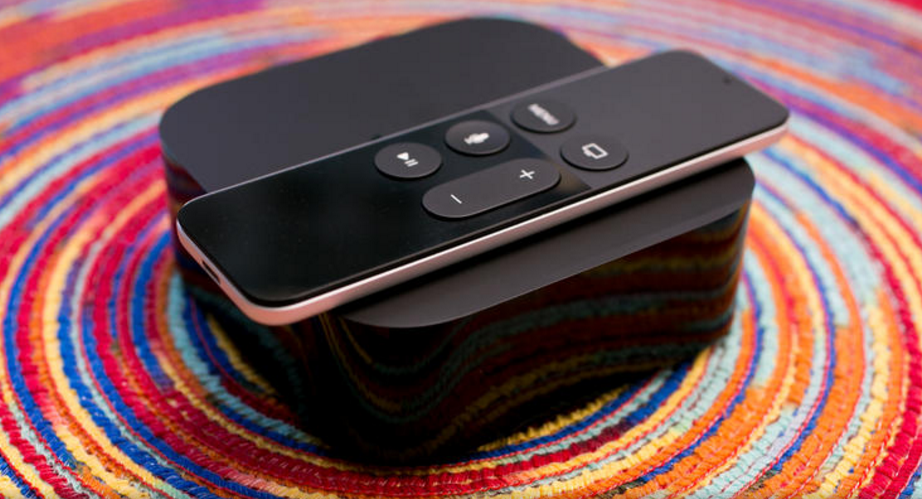
Same black brick, different feel altogether

It's been more than three and a half years since the first Apple TV went on sale, but Apple didn't break the physical mold. Glossy edges, rounded corners, a matte top with the requisite logo -- the two black boxes look basically identical. The new one is 0.4 inch taller, weighs 5.4 ounces more and felt like a solid brick when I pulled it out of the box.
In every important way, the new Apple TV feels better than the old one to use. It starts with the new remote. It has a touchpad, a few more buttons and a familiar mic icon to evoke Siri, the name for Apple's disembodied female voice assistant (DFVA). Unlike Siri on a phone (or Alexa, the DFVA on Amazon'sEcho and Fire TV ) Siri has no actual voice on Apple TV. Her replies are limited to words and visuals that appear on the screen, but she usually responds accurately and can perform some useful tricks.
The remote's touchpad is sensitive and fast, with just the right amount of friction, and the perfect size for one-thumb operation. It took a second to realize I had to click it to select anything, rather than just tap, but immediately afterward I was blowing through menus, zooming across thumbnails and navigating quicker than with any plodding click-based control. The menus let you choose a tracking speed. As someone who loves living dangerously, I chose "fast."
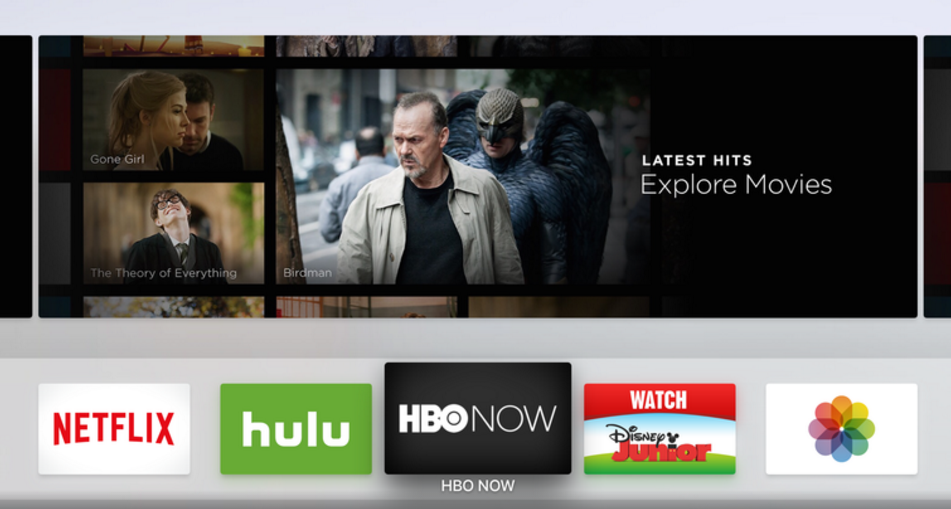
And those menus look different too. A clean white canvas to fill with the app icons you know from your phone, the new Apple TV home page allows nearly full customization. One of the first things I did after installing everything I wanted was to move Netflix, Hulu and HBO to the top row, along with Disney Junior for the kids, and move iTunes down a few rows since I don't buy many TV shows and movies from Apple. The top-row app you select expands above to show content within (as chosen by the app itself).
The old Apple TV came with numerous screen savers which appear after a period of inactivity. On the new one, for now, you just have a choice of your own photos or something called Aerial (above). Trust me, you should go with Aerial. It's a stunning collection of cityscapes, landscapes and landmarks shot in slow motion, and looks so good you might feel reluctant to ever turn your TV off.

Exploring the app store on a 65-inch screen

To fill Apple TV's white canvas you'll head to the app store, which is at heart the biggest difference between the old and the new Apple TV. And again it feels a lot like the store on an iPhone or iPad, with fewer choices (for now) and bigger icons.
The Purchased tab lists all of the apps you've installed on other devices that are also compatible with Apple TV. You download and install them individually, picking and choosing which ones you like (although I did wish for a big "Install all" button). In most cases if you've already paid for the app or game, it will be available for free on the Apple TV too -- but the decision to grandfather earlier purchases or charge you again is left up to each app's publisher. You'll have to sign in individually to each app that requires it of course, but once that happens your Apple TV will be fully armed and operational.
The store has nearly every app available on the old box, from Netflix to PBS to NFL, and of course numerous recent additions the old box lacks, like Plex. It also offers most of the company's staples like Apple Music, Photos (which draws from your iCloud and shared photos from friends) and Computers (which can access Macs on your home network to share iTunes libraries).
TV-centric apps occupy the top rows of the app store, but other categories are appearing all the time. Some are devoted to games, apps for kids, sports, news, and something called "Best New Apps," which gathers in the miscellany like Periscope, Gilt, Zillow, Airbnb, TripAdvisor, Sing Karaoke and more.
In just the first week after launch, Apple has added numerous categories to the main page and hundreds of apps and games, and the flood shows no signs of slowing down. Already there are more than a hundred that start with the letter "A." The downside, of course, is that the sheer number of apps already seems a bit overwhelming, and thick with stuff you might not care about. There are currently 15 different apps that fill your TV with a simulated fireplace, for example.
A few options exist to help stem the firehose. The Top Charts tab lists the most popular Paid, Free and Grossing apps (the latter, sadly, refers to money made, not fart and burp apps), and there's also a Categories tab, but they both need more granular sections. Categories is particularly pathetic at the moment, with just two options, "Entertainment" and "Games," that do nothing but shorten the main page to include those kinds of apps. Star ratings are also disappointing; some apps have them, usually with an "Editors' Choice" indicator, but the majority do not, and there's no way to rate apps yourself yet.
The Search tab shows trending apps and allows you to type in keywords to find stuff, and now you can search for apps by voice. I found Apple's on-screen keyboard faster than most others thanks to the swipe-friendly horizontal layout and snappy remote, but it does take some getting used-to. And like all on-screen keyboards it's much less convenient than using an external keyboard, especially for longer words or when entering passwords, your Apple ID and other chores. Reccent updates allow you to enter text via the official Remote app for iOS, as well as via voice dictation into the Siri remote or by attaching a Bluetooth keyboard.

One-thumb gaming

The first thing to know about gaming on the Apple TV is that you can always use the included remote; you don't need to buy a separate controller. The second thing is that with many games, a controller simply works better.
Most of the titles I played worked fine with the included touchpad remote, and there's something to be said about gaming with one thumb. I easily could hold my infant son while I played Crossy Road, for example.
That addictive chicken-smasher, with its simple controls and graphics, played beautifully and looked great on the big screen. So did JetPack Joyride and Bandland, both of which mainly consist of timed jumping. Slightly more complex controls worked well at times, for example steering on Does Not Commute (tapping either side of the pad) or swinging a bat with Beat Sports (swiping to move a bit, and swinging the controller like a Nintendo Wii). Where the touchpad controller failed for me was with quick movements requiring precise directions, like flying the ship in Geometry Wars, or directing the character to move across the map or attack something in Oceanhorn and Transistor.
One of the titles with the most complex controls at launch is Galaxy on Fire: Manticore Rising (above), exclusive to Apple TV for now. A space-based arcade shooter, it incorporates the remote's position as well as swipes and clicks on the touchpad. It played surprisingly well considering all that, and again only required one hand.
Two of the driving games, Asphalt 8 and Beach Buggy Racing, required me to put down my kid and hold the controller horizontally, like a steering wheel. Both were pretty forgiving and fun, but I definitely missed the precision of the controller.
I tried most of those games with a compatible controller, the Steel Series Stratus XL, and in most cases I found it more precise and responsive. But for casual games and quick one-off entertainment jaunts, it's pretty great to just pick up the remote and click.
Graphics, for what these games are, looked very impressive across the board. Even simple games like Crossy Road have been tuned up for the big screen, and higher-end titles like Galaxy on Fire and Transistor looked particularly good.
For more observations and play testing, check outGaming on the new Apple TV: First impressions and where it can go from here.

 A choice of sizes: 32GB vs. 64GB
In true Apple fashion the box comes in two otherwise identical flavors, one with 32GB and one with 64GB of onboard storage. Unlike the Amazon Fire TV, Nvidia Shield and Roku 4 with their SD card slots, there's no way to add storage yourself if you need it.
If you're really into gaming on Apple TV, then the more expensive version with twice the storage might be worthwhile. But people used to filling up their phones and tablets with photos, videos and games should realize that Apple TV accesses photos and video via the cloud, so they don't need to be stored on the device itself.
That leaves games, and Apple TV's operating system, TVOS, uses an a aggressive storage management system. It mandates small initial downloads (just 200MB per app) augmented by "on-demand resources," little chunks of data that can be downloaded quickly and deleted at need if the device fills up. The end result is that only very heavy gamers should expect to need the 64GB version.

Changhong UD42YC5500UA 4K

Changhong UD42YC5500UA 4K TV reviews claim 30Hz limit:

This week we have spoken about a lot of TV brands, with familiar brands such as Samsung, Sony and LG now available with discounts. However another brand has just become available and it’s one you may not have heard of before, so we are giving you a heads-up on a Changhong UD42YC5500UA 42-inch 4K TV review.
As you can guess, Changhong is a brand that originates from China. They have gone on to be very successful in the US market, providing big screen TVs at a fraction of the price compared to high street competitors.
Quality is key though and consumers will be weary if the features can still match the low prices that we see being waived around at the moment from retailers such as Newegg.
Changhong UD42YC5500UA specs look top notch from the outside. This is one of Changhong’s brand new 4K TV sets, offering an Ultra HD resolution of 3840 x 2160 – exactly the same as some of the big boys like this Samsung model.
Other specs include upscaling to UHD resolution for SD, HD and Full HD content. It also includes 4 HDMI ports, with support for Roku Streaming sticks as well – essentially converting this 4K TV into a Smart TV on the side.
Changhong advertises a 240Hz Enhanced Motion Rate feature, but fail to mention the native refresh rate of this TV, meaning that it will be 120Hz or even 60hz in reality.
This is unlikely to deter average consumers though, as 240hz emulated is still going to offer a fantastic picture quality for a so called ‘budget’ brand.
What may worry you however, is the Changhong UD42YC5500UA reviews that have been left for this particular model so far. Head to Newegg’s listing here and you can read through some reviews which are not particularly good reading for those considering a purchase.
The biggest problem that has been identified so far, is that this Changhong 42″ Class 4K Ultra HD LED TV reportedly only offers 4K resolution with a 30Hz refresh rate on a HDMI 1.4 connection.
This could be a problem for some of you, as 60Hz is needed for gaming purposes at the very least. It means that if you plan to buy this television for gaming, you may be forced to play with a lower resolution and not at full potential as advertised.
We ourselves could not even find this model listed at Changhong’s website, nor is there a Changhong UD42YC5500UA manual available to download – this 42-inch model is strangely missing from the manual section which we found odd.
Having said that, price is everything. If you just want a casual viewing experience and don’t intend to use this TV for gaming, it could still be ideal for you.
Let us know what you think of this model if you are considering it. A full Changhong UD42YC5500UA specs list can be found here.
Would 30Hz on a 4K resolution be a problem for you or not?

Vizio P2ui-B series

Vizio P2ui-B series review:

Price-busting 4K TV updates for an improved picture

THE GOOD: The Vizio P series delivers 4K resolution for significantly less than other major TV brands. Its picture quality, thanks to full-array local dimming, delivers deep black levels (aside from the 55-inch size) and excellent contrast for an LCD TV. Color accuracy and some aspects of video processing are solid, and input lag for gaming is among the lowest we've ever tested. The Vizio's feature set is well-chosen but not bloated, and it includes excellent connectivity with five 4K-compatible HDMI inputs.
THE BAD: Overly aggressive video processing still appears with 4K sources unless you manually turn it off. Competing 4K TVs offer better color and a more natural image, especially prior to picture setting calibration.
THE BOTTOM LINE: Great contrast and a market-busting price, along with a software update that largely fixes its video processing woes, help make the Vizio P series the best 4K value available today.

The Vizio P series was probably the most highly anticipated TV of 2014. Ever since it was introduced at CES 2014 at a starting price of $999 with the heady promise of full-array local dimming combined with 4K resolution, I envisioned an LCD TV that would be close to as recommendable as some of the plasmas of yore. Or at least, the most recommendable LCD TV of 2014.
Unfortunately for Vizio, it was not. My initial review revealed some pretty serious video processing issues, which made the picture look too sharp, overly-enhanced and even, with some material, plagued by artifacts like unnatural twinkles and twitchy moving lines. The worst part was you couldn't turn the processing off.
With its latest round of software updates, however, Vizio has (largely) fixed the issue, and the P series becomes much more recommendable. Its picture quality isn't quite the match of the Samsung HU8550, but it's much less expensive.
On the other hand, it's also hundreds more than other Vizios like the E-series and M-series , and its picture quality isn't that much better, despite the extra resolution of 4K (which, if I may reiterate, is barely visible anyway).
The additional problem for Vizio is that the TVs announced at CES 2015 will be making their way to store shelves in a couple of months, so buyers interested in the latest and greatest might already consider the darling of CES 2014 old hat. If you can overcome that bias, however, you'll find the P series an excellent performer and the best 4K TV value available today.
Editors' Note: This review has been updated since its initial publication based on changes observed as a result of installing new software, version 1.1.14. The scores for performance and value have each been raised from 7 to 8, and the overall score from 7.2 to 7.9. Please see the Picture Quality section for additional details.
Series information: I performed a hands-on evaluation of the 55-inch (P55) and 65-inch (P65) sizes, but this review also applies to the other screen sizes in the series. Aside from the differences noted in this review, especially related to the 55-incher's IPS panel (see 'Picture quality,' below), all sizes have identical specs, and according to the manufacturer should provide very similar picture quality.

Design

The 2014 Vizio M and P series look almost identical, except that the silver finish on the stand and sides of the P is somewhat darker, which I prefer. There's Vizio's characteristic "tab" logo on the far right, a thin, black bezel, the rounded corners and the matching open-base stand, which doesn't swivel. It's a nice, clean look, but certainly not a standout compared to most makers' 4K sets.
From the side, the 2014 P series is thicker than many LCD TVs, thanks in part to a direct LED backlight. That's a minor disadvantage in our book, not least because nobody watches TV from the side. It's still not exactly chunky.
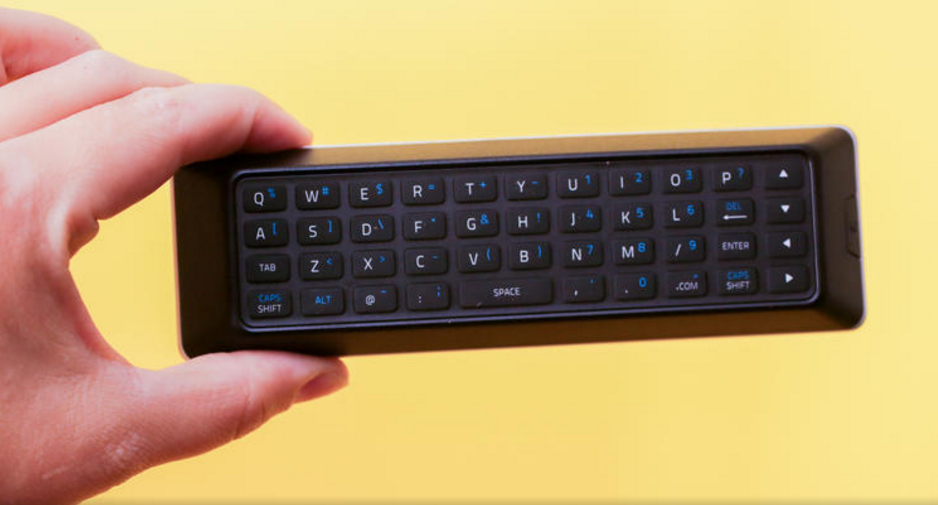
The topside of Vizio's remote is pretty mediocre. There's no backlighting, little key differentiation, and the arrangement of keys around the cursor always tripped me up. On the flip side is a full QWERTY keyboard that I liked a lot better. It's fully backlit and includes touches like directional keys and a dedicated ".com" button to ease log-ins.
The menu system has the same arrangement as other recent Vizio sets. It's basic, easy to navigate, and I appreciate the helpful on-screen touches, including descriptions of various menu items and access to the full user manual.

Features

Aside from 4K resolution, the headline feature here is full-array local dimming. Every other 4K TV with local dimming, full-array or edge-lit, is significantly more expensive than the P series, and indeed all but four mainstream 2014 4K sets -- the Sony XBR-X950B, the Toshiba L9400, the Panasonic AX900 andVizio's own R series -- have the typically less-effective edge-lit scheme. Each size in the P series gets 64 dimmable zones, with the exception of the 70-incher, which gets 72. Most sizes in the M-series, by way of comparison, get 32 zones, while the E-series has even fewer.
Vizio's website specifies a "240Hz effective refresh rate," but like all 4K TVs, the 2014/2015 P series actually has a 120Hz panel. The extra Hz supposedly comes from backlight scanning. Vizio isn't the only company to play these sorts of refresh rate games, and don't be surprised to see an even higher number -- "Clear Action Rate 960" -- quoted at times by the company.
You may also notice the absence of 3D in the chart above. Many of Vizio's previous TVs offeredpassive 3D compatibility. As of the 2014/2015 model year, Vizio has dropped the feature entirely, announcing no 3D-compatible televisions, even in the higher-end P and R series. That's a shame, because passive 3D is greatly improved by 4K.
Like most 2014 4K TVs the P series offers built-in HEVC decoding, allowing it to handle Netflix and other 4K streaming services.
On the off chance you care, the screen-mirroring functionality found on many TVs goes missing, and there's no official app to allow remote control from a phone and other sundries. You do get the limited screen mirroring of DIAL compatibility, however, which allows you to control the YouTube and Netflix apps Chromecast -style with your phone or tablet. I tried it with both iOS and Android phones, and it worked fine.
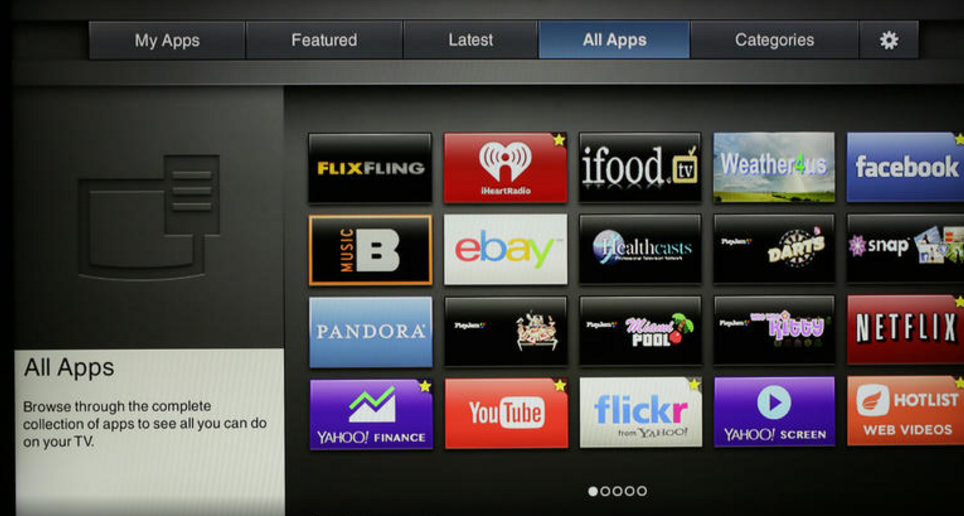
Smart TV: The same basic Smart TV interface, dubbed "VIA Plus," is used throughout Vizio's 2014 line. A row of app icons appear along the bottom of the screen, an arrangement aped in 2014 by Samsungand LG. You can re-arrange the seven icons within the "dock" and scroll to access more. If you prefer a full-screen interface, a second tap on the "V" button brings it up. I appreciated the excellent categorization, especially the ability to disregard the numerous "local TV" apps.
The P series naturally gets the version of Netflix that allows 4K streaming. The latest firmware update also adds additional 4K apps, including Amazon Instant, UltraFlix and Toon Googles.
Although it's no Roku , Vizio's app selection is very good. HBO Go isn't available (it's still a Samsungexclusive among TVs), and there are no major sports apps like MLB TV, NHL GameCenter, or NBA League Pass, but most of the other heavy-hitters for video are here. The meta-app "Web video" itself contains numerous sub-apps of specialized videos. Audio support is also extensive: you get iHeartRadio, TuneIn, Pandora and Spotify, although Rhapsody is no longer available.
The remote's backside QWERTY keyboard is a real boon, particularly for log-ins and searches. Not every app supports it, but I was happy to see Netflix and Amazon do.
Unlike most other major TV names, Vizio still doesn't offer a Web browser in its Smart TV system. That's no major loss since a laptop, tablet, or phone works much better anyway. Still, it's worth noting that some TV browsers -- namely Samsung and LG -- have improved a lot recently. Vizio's system also lacks the many extras found elsewhere, including cable-box control, universal search, voice command and more.
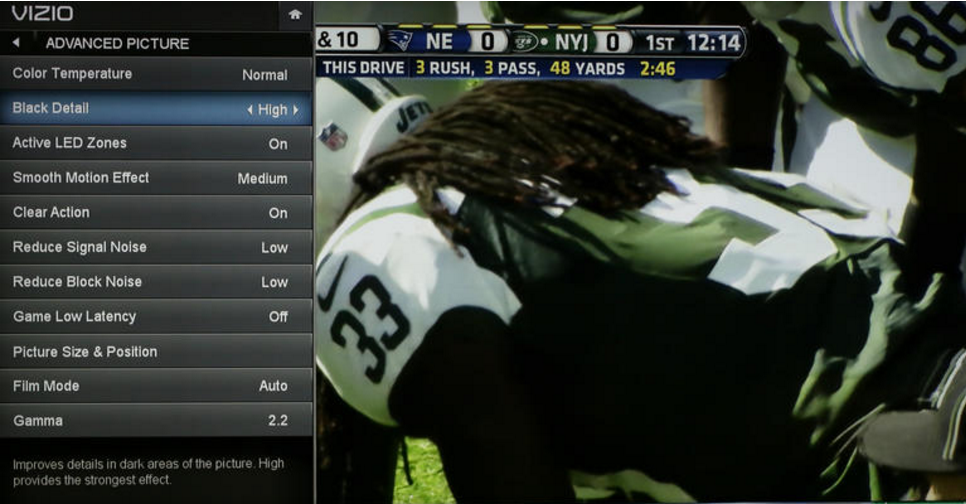
Picture settings: The P series has the most comprehensive range of picture controls of any Vizio TV, finally bringing it into line with the Samsungs and LGs of the world. In addition to the 2- and 10-point grayscale controls and CMS we appreciated from the M series, the P adds an actual gamma preset. You get an on/off toggle for local dimming and a Game Low Latency setting that cuts input lag on any picture mode.
The "Motion Blur Reduction" option engages backlight scanning to supposedly improve motion resolution, but in our tests it was ineffective. The "Smooth Motion Effect" setting offers three levels ofSoap Opera Effect.
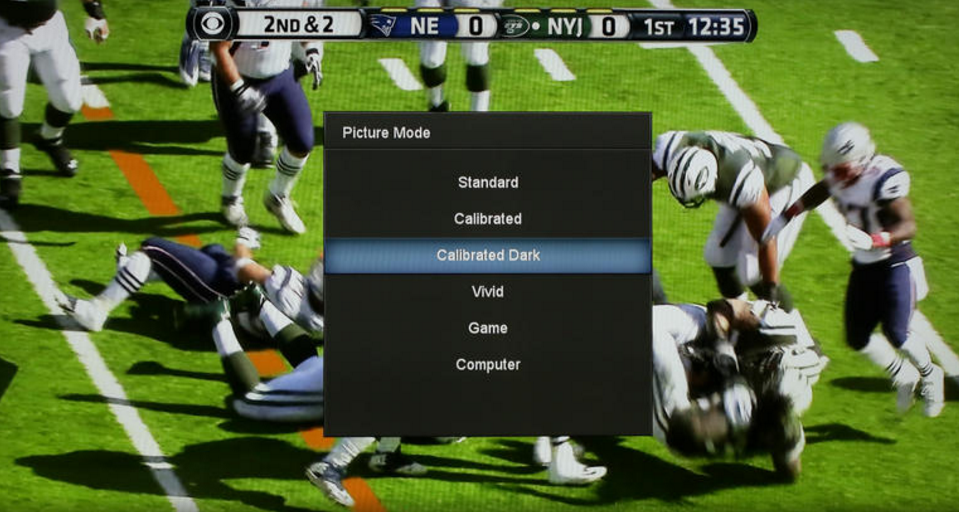
Another improvement over the M series is in the treatment of picture modes. Gone is the confusing switch back to a single custom mode after every adjustment. Instead, the mode you're adjusting is simply marked with an asterisk to indicate its settings are no longer in the default positions. If you like those settings you can save them in a custom picture mode (or more than one), which you can name anything you want and even lock, preventing inadvertent adjustment.
Connectivity: Of the five HDMI, four are version 1.4, meaning they can handle 1080p and 4K sources up to 30Hz. The fifth is HDMI 2.0 compatible, meaning it can also handle 4K sources up to 60Hz. In addition, this fifth input can accept 1080p signals up to 120Hz, although currently the only sources capable of outputting such signals are PCs.
I didn't test 1080p/120Hz, but I did check all 10 HDMI inputs on both review samples with 4K sources. They all behaved as expected, except for HDMI 1 on the P65. For whatever reason, I couldn't get it to properly display 4K/30 signal.
Like most 4K sets, the Vizio P series can't accept 4:4:4 chroma subsampling signals via any of its inputs. The company claims that's because three of the ports are compatible with HDCP 2.2, which doesn't allow 4:4:4 signals. This isn't a big deal to us since, once again, the only common 4:4:4 sources come from PCs.
Beyond HDMI, the Vizio's other physical connections include one each of USB, component-video, composite video, Ethernet and an RF tuner port. There's also an analog audio and optical digital audio output. As with other Vizio TVs, the P series' optical jack passes Dolby Digital.

Picture quality

As we mentioned at the top, the best thing about the P series picture is its contrast -- at least on every size but the 55-incher. We tested two sizes for this review, the 55-inch (P55) and the 65-inch (P65). The 65-inch set, as well as the 50-, 60- and 70-inch sizes in the series, use an LCD panel type known as VA. Only the 55-inch set uses a different panel type, known as IPS. Check out our Monitor Buying Guide for more on the differences between VA and IPS.