THE GOOD: The new Apple TV delivers the most polished video experience today, with speedy reactions and a familiar yet attractive interface. It has the best remote on the market. Siri's voice search makes finding stuff to watch even easier, with search results pulled from numerous services beyond iTunes. The selection of TV-based apps is very good, and AirPlay can be used for unsupported apps.
THE BAD: Apple TV costs more than similar devices like the Roku, Amazon Fire TV and Chromecast for basically the same core functions. There's no dedicated app for Amazon or any other a la carte video service beyond iTunes. Non-entertainment apps aren't very compelling yet, and the app store needs better organization.
THE BOTTOM LINE: The new Apple TV's awesome remote and voice control make it one of the best entertainment devices, especially for anyone who already owns plenty of Apple gadgets.
I have a confession to make. I'm an Android guy.
I've always owned Samsung phones and Windows computers, and tell family members to get Amazon Fire
tablets. I bought a
Mac in college but ended up paying a fortune for it as part of a student loan program and never bought one again. While my work laptop is a
MacBook (a recent switch), the only Apple product I've spent my own money on in the last 15 years is an iPad for my wife, and now it gets used mostly to entertain the kids during car rides.
But some of the smartest people I know swear by Apple products, and after playing with the new Apple TV for the last few days, I can see why. I've tested just about every other box and stick from
Roku, Amazon and Google over the years, not to mention countless Smart TV systems and plenty of game consoles. All of them can
stream videos from services like Netflix, Hulu and YouTube to your television, but none feels as nice as the new Apple TV.
The remote is simply the best I've ever used. Equipped with a responsive, thumb-sized touchpad it flies through menus, lists of TV show thumbnails and videos themselves, putting conventional cursor-based controls to shame. And voice search -- I guess you Apple people call it "Siri" for some reason -- works very well, and can do a lot more than just find stuff to watch.
The new Apple TV is not perfect. It costs more than comparable devices -- always my main gripe about Apple products. It lets you play plenty of games, but titles originally designed for phones and tablets aren't necessarily as appealing on a big screen, and most work best with a third-party game controller. And it galls me that the Apple TV remote is so good, I'd have to keep it around in addition to my
system-mastering Harmony rather than consigning it to a drawer like my other clickers.
My main issue though is lack of a real app for Amazon Video, my second-favorite streaming video service after Netflix. I don't know who to blame, Amazon or Apple or the streaming gods themselves, but regardless, it doesn't make any sense, especially since there's an Amazon app for iPhones and iPads. With Amazon's recent decision to
boot Apple TV and Chromecast devices from its store, I don't expect an Amazon app for Apple TV anytime soon.
If you're an Apple fan who owns a lot of TV shows, movies and games on Apple devices already, the new Apple TV is absolutely worth the money. For people like me, however, it's a tougher sell. I like
Rokubetter overall for its price-savvy search and wider app selection including Amazon,
Sling TV and Spotify, as well as its more affordable hardware.
To get the most out of Apple TV you need to be invested already in the Apple universe, with games, TV shows and movies you've purchased from iTunes and the App Store. That's a shame since it offers the best streaming experience today, and more potential tomorrow once app developers go to town finding ways to exploit the big screen and that slick remote. But if the previous Apple TV was any indication, this one's only going to grow more appealing.
Pricing information: The new Apple TV comes in in two versions: $149 for the 32GB model, and $199 for the 64GB model. The
previous Apple TV , first released in 2012, remains on sale at $69, £59 and AU$109. In the UK, the new model costs £129 for the 32GB and £169 for 64GB, while in Australia they cost AU$269 and AU$349. For most people I recommend the 32GB version. See "A choice of sizes: 32GB vs. 64GB" below for details.
Editors' notes: On March 21 Apple released an upgrade to the Apple TV's operating system, bringing it up to version 9.2. We're working on testing the new features now and will update this review soon.
Also, please note that this review refers to the US version. Some details, in particular available video-streaming apps, will vary in different territories
Same black brick, different feel altogether
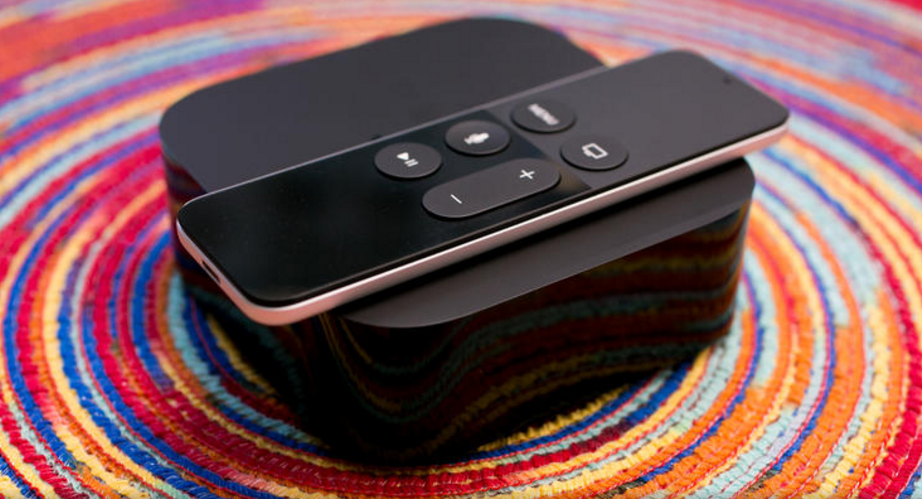
It's been more than three and a half years since the first Apple TV went on sale, but Apple didn't break the physical mold. Glossy edges, rounded corners, a matte top with the requisite logo -- the two black boxes look basically identical. The new one is 0.4 inch taller, weighs 5.4 ounces more and felt like a solid brick when I pulled it out of the box.
In every important way, the new Apple TV feels better than the old one to use. It starts with the new remote. It has a touchpad, a few more buttons and a familiar mic icon to evoke Siri, the name for Apple's disembodied female voice assistant (DFVA). Unlike Siri on a phone (or Alexa, the DFVA on Amazon'sEcho and Fire TV ) Siri has no actual voice on Apple TV. Her replies are limited to words and visuals that appear on the screen, but she usually responds accurately and can perform some useful tricks.
The remote's touchpad is sensitive and fast, with just the right amount of friction, and the perfect size for one-thumb operation. It took a second to realize I had to click it to select anything, rather than just tap, but immediately afterward I was blowing through menus, zooming across thumbnails and navigating quicker than with any plodding click-based control. The menus let you choose a tracking speed. As someone who loves living dangerously, I chose "fast."
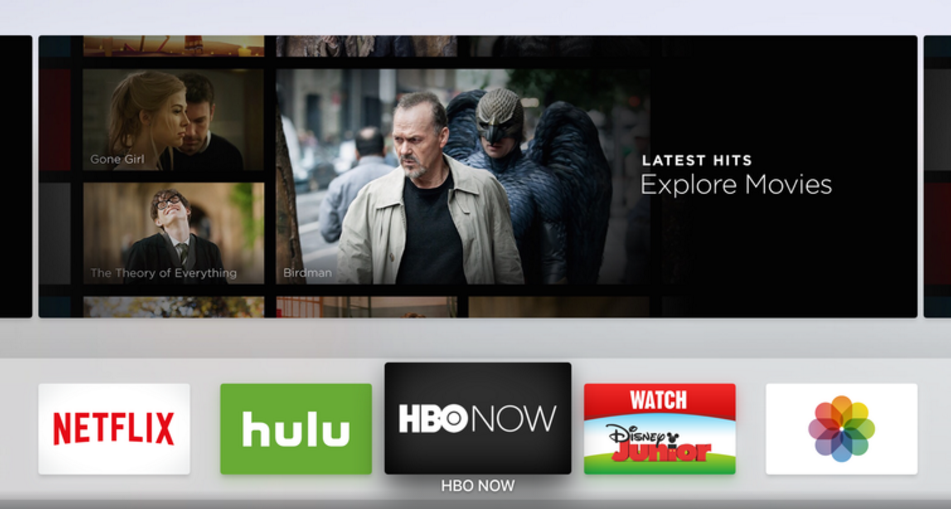
And those menus look different too. A clean white canvas to fill with the app icons you know from your phone, the new Apple TV home page allows nearly full customization. One of the first things I did after installing everything I wanted was to move Netflix, Hulu and HBO to the top row, along with Disney Junior for the kids, and move iTunes down a few rows since I don't buy many TV shows and movies from Apple. The top-row app you select expands above to show content within (as chosen by the app itself).
The old Apple TV came with numerous screen savers which appear after a period of inactivity. On the new one, for now, you just have a choice of your own photos or something called Aerial (above). Trust me, you should go with Aerial. It's a stunning collection of cityscapes, landscapes and landmarks shot in slow motion, and looks so good you might feel reluctant to ever turn your TV off.
Exploring the app store on a 65-inch screen
To fill Apple TV's white canvas you'll head to the app store, which is at heart the biggest difference between the old and the new Apple TV. And again it feels a lot like the store on an iPhone or iPad, with fewer choices (for now) and bigger icons.
The Purchased tab lists all of the apps you've installed on other devices that are also compatible with Apple TV. You download and install them individually, picking and choosing which ones you like (although I did wish for a big "Install all" button). In most cases if you've already paid for the app or game, it will be available for free on the Apple TV too -- but the decision to grandfather earlier purchases or charge you again is left up to each app's publisher. You'll have to sign in individually to each app that requires it of course, but once that happens your Apple TV will be fully armed and operational.
The store has nearly every app available on the old box, from Netflix to PBS to NFL, and of course numerous recent additions the old box lacks, like Plex. It also offers most of the company's staples like Apple Music, Photos (which draws from your iCloud and shared photos from friends) and Computers (which can access Macs on your home network to share iTunes libraries).
TV-centric apps occupy the top rows of the app store, but other categories are appearing all the time. Some are devoted to games, apps for kids, sports, news, and something called "Best New Apps," which gathers in the miscellany like Periscope, Gilt, Zillow, Airbnb, TripAdvisor, Sing Karaoke and more.
In just the first week after launch, Apple has added numerous categories to the main page and hundreds of apps and games, and the flood shows no signs of slowing down. Already there are more than a hundred that start with the letter "A." The downside, of course, is that the sheer number of apps already seems a bit overwhelming, and thick with stuff you might not care about. There are currently 15 different apps that fill your TV with a simulated fireplace, for example.
A few options exist to help stem the firehose. The Top Charts tab lists the most popular Paid, Free and Grossing apps (the latter, sadly, refers to money made, not fart and burp apps), and there's also a Categories tab, but they both need more granular sections. Categories is particularly pathetic at the moment, with just two options, "Entertainment" and "Games," that do nothing but shorten the main page to include those kinds of apps. Star ratings are also disappointing; some apps have them, usually with an "Editors' Choice" indicator, but the majority do not, and there's no way to rate apps yourself yet.
The Search tab shows trending apps and allows you to type in keywords to find stuff, and now you can search for apps by voice. I found Apple's on-screen keyboard faster than most others thanks to the swipe-friendly horizontal layout and snappy remote, but it does take some getting used-to. And like all on-screen keyboards it's much less convenient than using an external keyboard, especially for longer words or when entering passwords, your Apple ID and other chores. Reccent updates allow you to enter text via
the official Remote app for iOS, as well as via voice dictation into the Siri remote or by attaching a Bluetooth keyboard.
One-thumb gaming
The first thing to know about gaming on the Apple TV is that you can always use the included remote; you don't need to buy a separate controller. The second thing is that with many games, a controller simply works better.
Most of the titles I played worked fine with the included touchpad remote, and there's something to be said about gaming with one thumb. I easily could hold my infant son while I played Crossy Road, for example.
That addictive chicken-smasher, with its simple controls and graphics, played beautifully and looked great on the big screen. So did JetPack Joyride and Bandland, both of which mainly consist of timed jumping. Slightly more complex controls worked well at times, for example steering on Does Not Commute (tapping either side of the pad) or swinging a bat with Beat Sports (swiping to move a bit, and swinging the controller like a Nintendo Wii). Where the touchpad controller failed for me was with quick movements requiring precise directions, like flying the ship in Geometry Wars, or directing the character to move across the map or attack something in Oceanhorn and Transistor.

One of the titles with the most complex controls at launch is Galaxy on Fire: Manticore Rising (above), exclusive to Apple TV for now. A space-based arcade shooter, it incorporates the remote's position as well as swipes and clicks on the touchpad. It played surprisingly well considering all that, and again only required one hand.
Two of the driving games, Asphalt 8 and Beach Buggy Racing, required me to put down my kid and hold the controller horizontally, like a steering wheel. Both were pretty forgiving and fun, but I definitely missed the precision of the controller.
I tried most of those games with a
compatible controller, the Steel Series Stratus XL, and in most cases I found it more precise and responsive. But for casual games and quick one-off entertainment jaunts, it's pretty great to just pick up the remote and click.
Graphics, for what these games are, looked very impressive across the board. Even simple games like Crossy Road have been tuned up for the big screen, and higher-end titles like Galaxy on Fire and Transistor looked particularly good.
For more observations and play testing, check outGaming on the new Apple TV: First impressions and where it can go from here.
A choice of sizes: 32GB vs. 64GB
In true Apple fashion the box comes in two otherwise identical flavors, one with 32GB and one with 64GB of onboard storage. Unlike the Amazon Fire TV, Nvidia Shield and Roku 4 with their SD card slots, there's no way to add storage yourself if you need it.
If you're really into gaming on Apple TV, then the more expensive version with twice the storage might be worthwhile. But people used to filling up their phones and tablets with photos, videos and games should realize that Apple TV accesses photos and video via the cloud, so they don't need to be stored on the device itself.
That leaves games, and Apple TV's operating system, TVOS, uses an a aggressive storage management system. It mandates small initial downloads (just 200MB per app) augmented by "on-demand resources," little chunks of data that can be downloaded quickly and deleted at need if the device fills up. The end result is that only very heavy gamers should expect to need the 64GB version.