Friday, 20 May 2016

Vizio P2ui-B series

Vizio P2ui-B series review:

Price-busting 4K TV updates for an improved picture

THE GOOD: The Vizio P series delivers 4K resolution for significantly less than other major TV brands. Its picture quality, thanks to full-array local dimming, delivers deep black levels (aside from the 55-inch size) and excellent contrast for an LCD TV. Color accuracy and some aspects of video processing are solid, and input lag for gaming is among the lowest we've ever tested. The Vizio's feature set is well-chosen but not bloated, and it includes excellent connectivity with five 4K-compatible HDMI inputs.
THE BAD: Overly aggressive video processing still appears with 4K sources unless you manually turn it off. Competing 4K TVs offer better color and a more natural image, especially prior to picture setting calibration.
THE BOTTOM LINE: Great contrast and a market-busting price, along with a software update that largely fixes its video processing woes, help make the Vizio P series the best 4K value available today.

The Vizio P series was probably the most highly anticipated TV of 2014. Ever since it was introduced at CES 2014 at a starting price of $999 with the heady promise of full-array local dimming combined with 4K resolution, I envisioned an LCD TV that would be close to as recommendable as some of the plasmas of yore. Or at least, the most recommendable LCD TV of 2014.
Unfortunately for Vizio, it was not. My initial review revealed some pretty serious video processing issues, which made the picture look too sharp, overly-enhanced and even, with some material, plagued by artifacts like unnatural twinkles and twitchy moving lines. The worst part was you couldn't turn the processing off.
With its latest round of software updates, however, Vizio has (largely) fixed the issue, and the P series becomes much more recommendable. Its picture quality isn't quite the match of the Samsung HU8550, but it's much less expensive.
On the other hand, it's also hundreds more than other Vizios like the E-series and M-series , and its picture quality isn't that much better, despite the extra resolution of 4K (which, if I may reiterate, is barely visible anyway).
The additional problem for Vizio is that the TVs announced at CES 2015 will be making their way to store shelves in a couple of months, so buyers interested in the latest and greatest might already consider the darling of CES 2014 old hat. If you can overcome that bias, however, you'll find the P series an excellent performer and the best 4K TV value available today.
Editors' Note: This review has been updated since its initial publication based on changes observed as a result of installing new software, version 1.1.14. The scores for performance and value have each been raised from 7 to 8, and the overall score from 7.2 to 7.9. Please see the Picture Quality section for additional details.
Series information: I performed a hands-on evaluation of the 55-inch (P55) and 65-inch (P65) sizes, but this review also applies to the other screen sizes in the series. Aside from the differences noted in this review, especially related to the 55-incher's IPS panel (see 'Picture quality,' below), all sizes have identical specs, and according to the manufacturer should provide very similar picture quality.

Design

The 2014 Vizio M and P series look almost identical, except that the silver finish on the stand and sides of the P is somewhat darker, which I prefer. There's Vizio's characteristic "tab" logo on the far right, a thin, black bezel, the rounded corners and the matching open-base stand, which doesn't swivel. It's a nice, clean look, but certainly not a standout compared to most makers' 4K sets.
From the side, the 2014 P series is thicker than many LCD TVs, thanks in part to a direct LED backlight. That's a minor disadvantage in our book, not least because nobody watches TV from the side. It's still not exactly chunky.
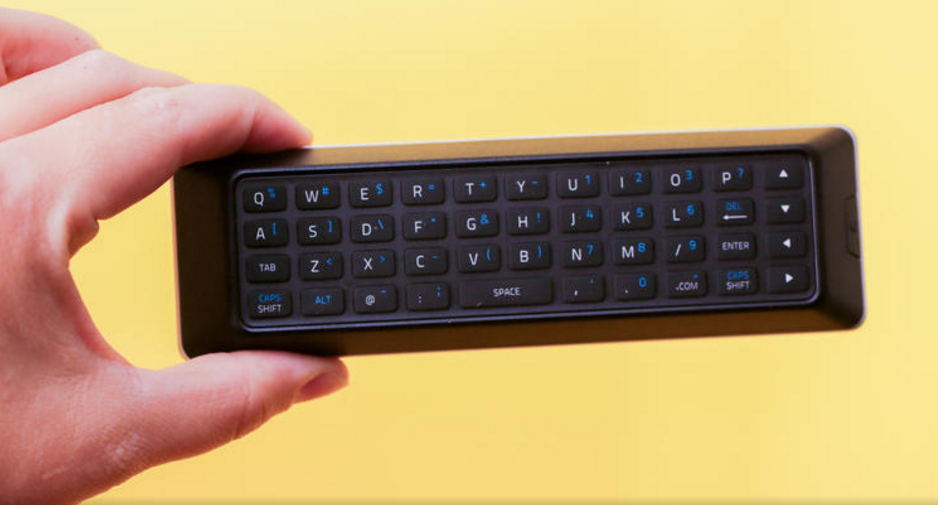
The topside of Vizio's remote is pretty mediocre. There's no backlighting, little key differentiation, and the arrangement of keys around the cursor always tripped me up. On the flip side is a full QWERTY keyboard that I liked a lot better. It's fully backlit and includes touches like directional keys and a dedicated ".com" button to ease log-ins.
The menu system has the same arrangement as other recent Vizio sets. It's basic, easy to navigate, and I appreciate the helpful on-screen touches, including descriptions of various menu items and access to the full user manual.

Features

Aside from 4K resolution, the headline feature here is full-array local dimming. Every other 4K TV with local dimming, full-array or edge-lit, is significantly more expensive than the P series, and indeed all but four mainstream 2014 4K sets -- the Sony XBR-X950B, the Toshiba L9400, the Panasonic AX900 andVizio's own R series -- have the typically less-effective edge-lit scheme. Each size in the P series gets 64 dimmable zones, with the exception of the 70-incher, which gets 72. Most sizes in the M-series, by way of comparison, get 32 zones, while the E-series has even fewer.
Vizio's website specifies a "240Hz effective refresh rate," but like all 4K TVs, the 2014/2015 P series actually has a 120Hz panel. The extra Hz supposedly comes from backlight scanning. Vizio isn't the only company to play these sorts of refresh rate games, and don't be surprised to see an even higher number -- "Clear Action Rate 960" -- quoted at times by the company.
You may also notice the absence of 3D in the chart above. Many of Vizio's previous TVs offeredpassive 3D compatibility. As of the 2014/2015 model year, Vizio has dropped the feature entirely, announcing no 3D-compatible televisions, even in the higher-end P and R series. That's a shame, because passive 3D is greatly improved by 4K.
Like most 2014 4K TVs the P series offers built-in HEVC decoding, allowing it to handle Netflix and other 4K streaming services.
On the off chance you care, the screen-mirroring functionality found on many TVs goes missing, and there's no official app to allow remote control from a phone and other sundries. You do get the limited screen mirroring of DIAL compatibility, however, which allows you to control the YouTube and Netflix apps Chromecast -style with your phone or tablet. I tried it with both iOS and Android phones, and it worked fine.
Smart TV: The same basic Smart TV interface, dubbed "VIA Plus," is used throughout Vizio's 2014 line. A row of app icons appear along the bottom of the screen, an arrangement aped in 2014 by Samsungand LG. You can re-arrange the seven icons within the "dock" and scroll to access more. If you prefer a full-screen interface, a second tap on the "V" button brings it up. I appreciated the excellent categorization, especially the ability to disregard the numerous "local TV" apps.
The P series naturally gets the version of Netflix that allows 4K streaming. The latest firmware update also adds additional 4K apps, including Amazon Instant, UltraFlix and Toon Googles.
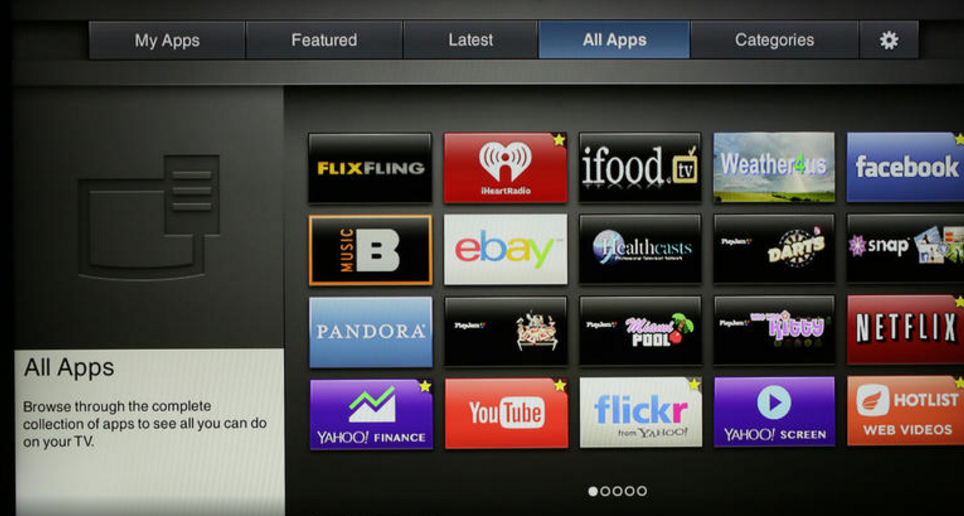
Although it's no Roku , Vizio's app selection is very good. HBO Go isn't available (it's still a Samsungexclusive among TVs), and there are no major sports apps like MLB TV, NHL GameCenter, or NBA League Pass, but most of the other heavy-hitters for video are here. The meta-app "Web video" itself contains numerous sub-apps of specialized videos. Audio support is also extensive: you get iHeartRadio, TuneIn, Pandora and Spotify, although Rhapsody is no longer available.
The remote's backside QWERTY keyboard is a real boon, particularly for log-ins and searches. Not every app supports it, but I was happy to see Netflix and Amazon do.
Unlike most other major TV names, Vizio still doesn't offer a Web browser in its Smart TV system. That's no major loss since a laptop, tablet, or phone works much better anyway. Still, it's worth noting that some TV browsers -- namely Samsung and LG -- have improved a lot recently. Vizio's system also lacks the many extras found elsewhere, including cable-box control, universal search, voice command and more.
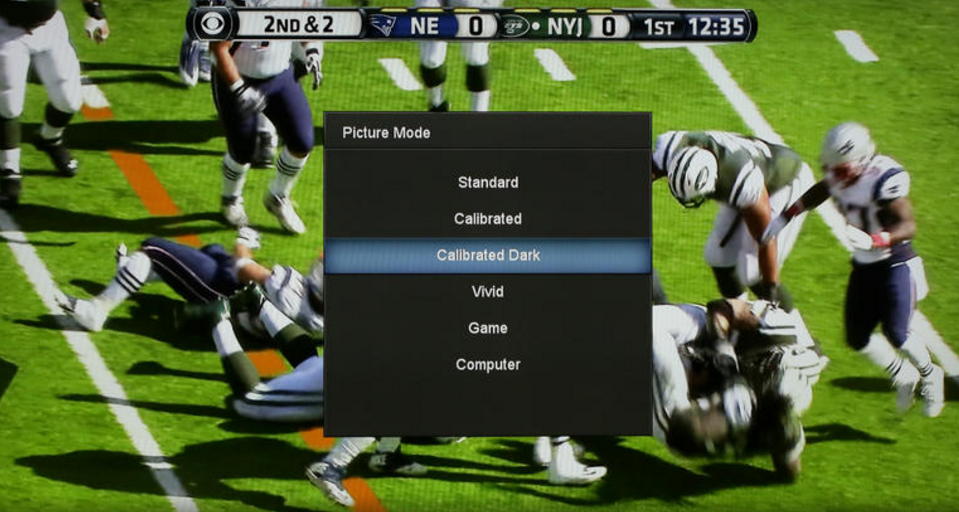
Picture settings: The P series has the most comprehensive range of picture controls of any Vizio TV, finally bringing it into line with the Samsungs and LGs of the world. In addition to the 2- and 10-point grayscale controls and CMS we appreciated from the M series, the P adds an actual gamma preset. You get an on/off toggle for local dimming and a Game Low Latency setting that cuts input lag on any picture mode.
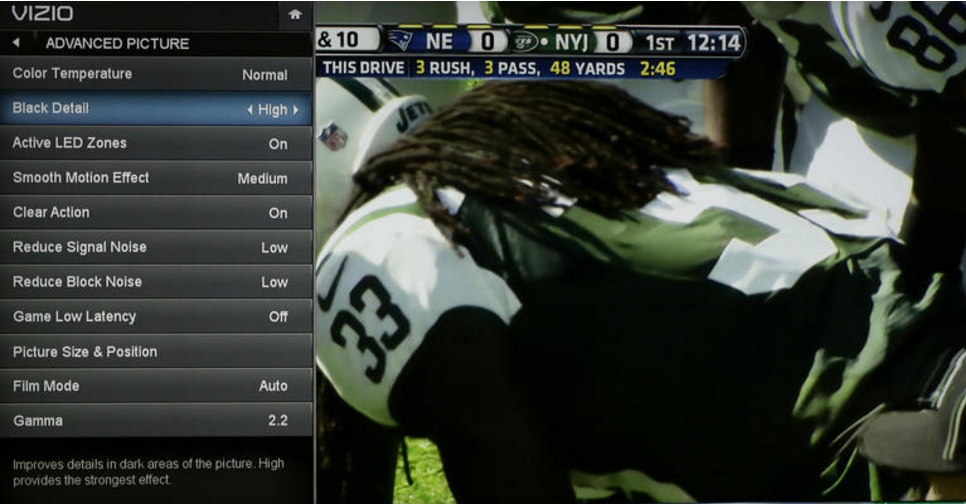
The "Motion Blur Reduction" option engages backlight scanning to supposedly improve motion resolution, but in our tests it was ineffective. The "Smooth Motion Effect" setting offers three levels ofSoap Opera Effect.
Another improvement over the M series is in the treatment of picture modes. Gone is the confusing switch back to a single custom mode after every adjustment. Instead, the mode you're adjusting is simply marked with an asterisk to indicate its settings are no longer in the default positions. If you like those settings you can save them in a custom picture mode (or more than one), which you can name anything you want and even lock, preventing inadvertent adjustment.
Connectivity: Of the five HDMI, four are version 1.4, meaning they can handle 1080p and 4K sources up to 30Hz. The fifth is HDMI 2.0 compatible, meaning it can also handle 4K sources up to 60Hz. In addition, this fifth input can accept 1080p signals up to 120Hz, although currently the only sources capable of outputting such signals are PCs.
I didn't test 1080p/120Hz, but I did check all 10 HDMI inputs on both review samples with 4K sources. They all behaved as expected, except for HDMI 1 on the P65. For whatever reason, I couldn't get it to properly display 4K/30 signal.
Like most 4K sets, the Vizio P series can't accept 4:4:4 chroma subsampling signals via any of its inputs. The company claims that's because three of the ports are compatible with HDCP 2.2, which doesn't allow 4:4:4 signals. This isn't a big deal to us since, once again, the only common 4:4:4 sources come from PCs.
Beyond HDMI, the Vizio's other physical connections include one each of USB, component-video, composite video, Ethernet and an RF tuner port. There's also an analog audio and optical digital audio output. As with other Vizio TVs, the P series' optical jack passes Dolby Digital.

Picture quality

As we mentioned at the top, the best thing about the P series picture is its contrast -- at least on every size but the 55-incher. We tested two sizes for this review, the 55-inch (P55) and the 65-inch (P65). The 65-inch set, as well as the 50-, 60- and 70-inch sizes in the series, use an LCD panel type known as VA. Only the 55-inch set uses a different panel type, known as IPS. Check out our Monitor Buying Guide for more on the differences between VA and IPS.

Panasonic Lumix DMC-LX100

Panasonic Lumix DMC-LX100 review:

Advanced compact hits all the right notes


THE GOOD: The Panasonic LX100 delivers really good photo and video quality, a great set of features, and class-leading performance.
THE BAD: It's got a fixed LCD and the lens really needs a hood to minimize flare.
THE BOTTOM LINE: With really good photo and video quality, a great set of features and generally class-leading performance, the Panasonic Lumix DMC-LX100 is probably one of our favorite compact cameras ever. It's not for the inexperienced, though.
Panasonic retakes the lead in the advanced compact competition with its LX100. Really good photo and video quality, a great set of features and (for the most part) class-leading performance, result in one of my favorite compact cameras ever.
Despite a full auto mode, however, newbies might face a steep climb up the learning curve. At $900 (£800, AU$1,200), it's also pretty expensive if you're just looking for an upgrade to better photo and video than whatever you're using now.
As a companion for a dSLR or an alternative to a midrange interchangeable-lens model, though, it's definitely worth considering.

Image quality

The combination of a great lens and large -- for its class -- sensor yield extremely good photo quality. JPEG images look clean as high as ISO 800 and good through ISO 1600; by ISO 3200 the JPEGs display noise reduction smearing. If you shoot raw, though, you can eke out more detail resolution as high as ISO 12800.
The LX100's Four Thirds sensor is much bigger than the 1-inch sensor in the RX100 series, though just a hair smaller than the 1.5-inch version in Canon's higher-end PowerShot.
However, there isn't a lot of recoverable detail in the highlights and shadows of the raw files, which is a typical problem in this class. Shadow detail starts to disappear at ISO 800 and dark colors start to become indistinguishable from each other at around ISO 3200 and whites/light colors at around ISO 400. Also fairly typical.
Even in its default color settings, the LX100 delivers reasonably neutral results, at least up through ISO 1600. At ISO 3200 and above the white balance gets a little inconsistent, developing a slight red cast. However, most of these cameras have a pinkish cast, at least in the JPEGs, across all or part of their ISO sensitivity range.
Its 4K video is unsurprisingly great given that it uses the same imaging engine as the GH4. There are few artifacts, and the video is sharp with a reasonable dynamic range -- it looks better than HD even when viewed on a non-4K display. At midrange ISO sensitivities (like ISO 3200), there's none of the sparkling caused by noise in motion, though like many cameras it clips the tonal range. The audio sounds fine, but this isn't the camera to buy if you're picky about sound, as there's no support for an external mic and the lens operation is a bit noisy. Keep in mind that 4K recording does require aUHS-II SD card.
There's a also a 4K Photo mode that allows you to pull decent 8MP stills from video (it differs from standard recording because it increases the frame rate off the sensor so that it can stop action better, but it also increases battery drain). It seems like an effective way to shoot action when continuous-shooting is difficult.

Analysis samples

(Unless you view the samples at their full 770-pixel width they won't look right.)
JPEG images are extremely clean up through ISO 800, retaining a surprising amount of detail given the camera's relatively low resolution.
You can see a noticeable color shift between ISO 1600 and ISO 3200, but the images retain a respectable amount of detail in the in-focus areas up through the entire range.
The LX100 produces very natural colors, even on its default setting, though like most cameras it pushes saturation just a little.
Despite its lower resolution, the LX100 preserves a surprising amount of detail compared to competitors.
The lens displays very nice out-of-focus areas, and even on high ISO sensitivity photos they lack the graininess you tend to see in those spots.

Performance

For an enthusiast compact, the LX100 performs quite well. Its only drawback is slow startup: 2.5 seconds to power on, focus and shoot. That's due in part to the leisurely pace at which the lens extends. Otherwise, the camera focuses and shoots in about 0.2 second, in both bright or dim conditions; it takes about 0.4 second to shoot two sequential JPEGs (0.5 second for raw), and enabling flash bumps that to 1.5 seconds. Those are all very good times.
My continuous-shooting performance results are tentative. A lot has been made of this camera's ability to shoot 6.5 frames per second with autofocus and autoexposure (AF/AE), but I was only able to achieve 4fps under our standard test conditions (as well as all sorts of other conditions). The only way I could get the camera to shoot faster with AF/AE was, oddly, at f1.7, and even then it only made it to to 6fps. I generally find tested performance matches the manufacturer's specifications, so I'm not confident of these results, and am waiting back to hear from a stumped Panasonic. Frankly, it doesn't affect my rating, since even 4fps for over 30 raw or JPEG shots with AF/AE is quite good for its class.
With focus and exposure fixed on the first frame, it hits 11fps, and if you don't care about mechanical vs. electronic shutter, its Super high-speed mode runs at 40fps. You can use those modes to create stop-motion animations in-camera.
While the autofocus system is fast, Panasonic's full auto suffers from the same problems as everyone else's: it focuses on the closest object in the scene, which is usually wrong. The tracking autofocus is pretty typical -- sometimes it works, sometimes it doesn't -- and like most other contrast AF systems, there's a slight pulse using continuous AF while shooting video. However, the camera's Custom Multi option lets you configure an autofocus area array any way you want, such as a clump of areas in the center or even discontiguous areas. The center-area autofocus and pinpoint autofocus work quickly and accurately. Thanks to the viewfinder, focus peaking and the smooth control ring, manually focusing works well.
Typical for this type of camera, the battery life is pretty meh, especially if you use the viewfinder and Wi-Fi a lot. I had no issues with visibility of the back LCD.

Design and features

It's bigger and heavier than the RX100 III, but in exchange the LX100 has an actual, usable rubberized grip that makes the camera comfortable to hold and shoot, even one-handed. It fits in a loose jacket pocket, but you won't be sliding it into your jeans the way you might with the RX100 series.
The lens is relatively large --technologically necessary for a fast, wide-angle lens on a sensor this big -- and as with previous LX series models there are aspect ratio and focus mode switches and a manual aperture ring on the lens, plus a programmable ring that's become de rigeur on advanced compacts. The aperture ring has protrusions on either side that make it easy to operate, even when wearing gloves. Note that the camera doesn't have a multi-aspect sensor: as you change aspect ratios the resolution changes, with the 4:3 aspect ratio having the highest-resolution images.
On the top sit the hot shoe, shutter speed and exposure compensation dials; zoom lever; and buttons to access complete auto mode and special-effects filter selections. As with other cameras that incorporate physical shutter speed and aperture controls, you access priority exposure modes by switching either or both dials to "A" (for example, you enter Shutter priority mode by rotating the aperture dial to A and manually selecting the shutter speed). I'd love a lock button on the exposure compensation dial for all cameras with this design, though, as I tend to rotate the dial accidentally.
The back has a typical point-and-shoot design, with a thumb-operated button/dial control for direct access to ISO sensitivity, white balance, drive mode and autofocus-area settings. The button in the center brings up the menu system, while a button above it accesses the quick menu, whose layout varies depending on the current display settings. There are also three programmable function buttons, the movie record button, and an AE/AF lock button. While I like the layout of the controls, they're a little too flat for my taste, at least for winter-glove-handed shooting.
Small, but not too small, I find the electronic viewfinder a lot more convenient than the retractable version on the RX100 III. And while it can auto-switch between the display and the EVF, you can lower the sensitivity, which makes it much more usable than other auto-switching behavior.
Panasonic has most of the bases covered for connectivity, though I wasn't happy with the implementation. With thePanasonic Image app onAndroid you can either tap the left side of the camera to the back of your device to set up and initiate a connection via Wi-Fi, or use the app to photograph a QR code to set up the connection; the latter is the way to go for iOS devices. With the app, you have full remote control, sort of. I found the app buggy and laggy on both the HTC One (M7) -- including the NFC and QR code connections -- and iPhone 5S. It worked okay on an iPad Air.
You can also view and transfer photos and videos from the camera to your device, or tap to send individual photos from the camera to your phone (only onAndroid). The camera's Wi-Fi can also be used for other things including direct uploads to social networks. However, you have to sign up for a Lumix Club account and register all the services you want to use on there. Frankly, sending images from the camera direct to your device is easy enough that I would skip Lumix Club and just upload from your smartphone (or tablet). You can read more about the apps on Panasonic's site.
As much as I like the camera, I do have some other problems with the camera's design and operation. Most important, the camera really (reallyreally) needs a lens hood and a built-in a neutral density filter; it's more prone to flare than any camera I've used recently. It does accept 43mm screw-in lens filters at least. And while I like the viewfinder, I miss a tilting or articulating display. Also, Panasonic has a nice aperture-like lens cap that it offers as a $40 accessory for the LX100; for a $900 camera, it should be standard.
There are also some drawbacks with respect to video. The aperture ring feels clicky, which is great for providing feedback but not so great for changing aperture while shooting video. Lens zooming is a little noisy for video, as are the dangly strap holders which click against the body. Furthermore, some people might miss having a mic input, though that feature is pretty unusual for this class.
For a complete overview of the LX100's features and operation, download the manual.

Conclusion

There are APS-C models like the Fujifilm X100 series, the Nikon Coolpix A or the Ricoh GR that deliver better photo quality, but they also lack the features, performance and video quality that the LX100 offers.
The LX100 is far from perfect. I really miss having a tilting or articulating LCD, the camera really should come with a lens hood, the buttons feel a little too flat and a tripod plate obstructs the battery and SD card compartment.
Overall, though, it's a great package. It's not cheap, but as the price drops over time it'll be a great buy for proficient photographers.

Comparative specifications


Nikon D3300

Nikon D3300 review:

Nice photos, reasonably fast


HE GOOD: The Nikon D3300's photo quality improves on its predecessor, and while it's not incredibly fast it performs pretty well for its price class.
THE BAD: The feature set remains pretty limited.
THE BOTTOM LINE: Very good photo quality for its class plus decent performance make the Nikon D3300 A solid choice for a first dSLR.
With somewhat better photo quality and slightly better performance, the Nikon D3300 delivers a modest improvement over its predecessor the D3200 -- enough to bump up its rating and improve its status relative to some competitors, but no so much that it's definitively worth the extra money over the D3200 for buyers on tight budgets. The rest of the updates, such as 1080/60p video, a redesigned beginner's Guide Mode, plus a slightly smaller, lighter body, barely move the needle. It retains the same 11-point autofocus system of its predecessor, and lacks built-in Wi-Fi; you still have to go dongle for that.

Image quality

Photos are the camera's strongest suit. The D3300 improves on the image quality of the D3200, with most images appearing somewhat sharper as you'd expect from the new 24-megapixel antialiasing-filter-free sensor, and the camera fares pretty compared to competitors. Also, for example, ISO 3200 JPEGs look a lot less noisy than their counterparts from the D3200, but the raw files seem to clean up about the same, pointing mostly to the inevitable improvements in Nikon's image processing over the past two years. JPEGs look very clean through ISO 400 and display only minimal artifacts through ISO 1600. Depending upon scene content the photos are usable through ISO 6400, but above that the less-bright colors become too desaturated and the tonal ranges compress unattractively.
Colors look quite accurate, and there's a reasonable amount of recoverable highlight and shadow detail in raw files given the camera's price class. Its video looks good, even in low light.

Performance

Overall, the D3300 tests faster than the D3200 and many of its competitors, but it still feels pretty slow to shoot with -- possibly because of the relatively sluggish new kit lens. It takes half a second to power on, focus, and shoot; that's not bad. Time to focus and shoot in good light runs about 0.4 second, rising to 0.6 second in dim light. It does perform quite fast when shooting two consecutive photos, 0.2 second regardless whether you're using raw or JPEG, since it doesn't attempt to refocus, rising to 0.9 second with flash enabled.
Live View performance remains terrible, taking almost 2 seconds to focus and shoot thanks to slow everything -- slow autofocus, slow mirror movement -- and two consecutive JPEG shots takes 3.7 seconds.
The camera delivers an excellent 5.1fps burst when equipped with a 95MB/sec SD card (almost 4.4fps for raw) with autofocus and with no significant slowing -- it just gets a little more variable -- for more than 30 frames. However, the autofocus can't really keep up with the frame rate so there are a lot of misses.
The annoying small, dim viewfinder hasn't changed, unsurprising since that's typical for these entry-level models. I really dislike the tiny focus points which only illuminate (and briefly) when you half-press the shutter. They're impossible to see in moderate to dim light, so if you shoot on anything other than full auto you first have to press the shutter to find the appropriate focus point (in my case, center) before you can even begin to frame the scene. The LCD hasn't changed, but it's a good size, bright and reasonably visible in bright sunlight.

SHOOTING SPEED (IN SECONDS)

NOTE:

 Shorter bars indicate better performance

Design and features


The body looks almost identical to the D3200 (which had barely changed from the D3100 before that) except for a few tweaks. It's light and a bit plasticky with a deep, comfortable grip. On top of the grip sits the power switch and shutter button, and behind that a trio of buttons: a somewhat hard-to-feel record button, plus exposure compensation and info display. The crowded mode dial serves up the the typical assortment of manual, semi-manual and automatic modes, plus a Guide mode and Effects mode (with the usual suspects).
One of the benefits of dSLRs in general are the huge grips.

Huawei's Windows 10 tablet

Huawei's Windows 10 tablet packs a stylus with a frickin' laser pointer built in:

The thin, light, attractive MateBook that Huawei introduced at Mobile World Congress obviously takes a few design cues from Apple's iPad Pro, including a folding keyboard case and a pressure-sensitive digital pen for writing or drawing on the screen.
Huawei's, though, comes with a bonus: a built-in laser pointer on one end that you can use to emphatically circle or underscore key points during a presentation -- or just use to drive the feline population nuts.
The rest of the package looks more than a little familiar (aka, like the iPad Pro), from the folding keyboard case to the tablet's sleek, aluminum body. Of course, the 12-inch MateBook (incidentally, Huawei's first tablet-PC hybrid) runs Windows 10 software, like Microsoft's own Surface 4 Pro. It automatically prompts you when you switch from tablet mode to PC mode, which shifts the display to make it more like either a handheld or laptop-like experience.
The MateBook attaches to its keyboard case by way of sturdy magnets that, as we accidentally found out, are strong enough to hold fast even when the keyboard is dangling in the air, so you shouldn't have to worry too much about the parts disconnecting when you're toting it around.
The stylus offers 2,048 levels of pressure sensitivity.

The case folds up into a stand much like the keyboard case on the iPad Pro, and like Apple's gargantuan tablet, you're limited to just one viewing angle if you prop the device upright. At this point, we prefer the Surface Pro 4's more flexible hinge, but that hinge also adds bulk: the MateBook is 6.9mm (0.27 inch) thick and weighs in at 640 grams (1.4 pounds), sans keyboard. The Intel Core m3 variant of the Surface Pro 4, by contrast, is 8.45mm (.33 inch) thick, and weighs 766 grams (1.7 pounds).
Oh, and one other thing. The only camera is on the front, so while you can make video calls, you won't be obnoxiously holding it over your head at a concert trying to get a good shot.
Things get a little confusing from here on out, because, like a lot of these hybrids, there are three models, starting with a Core M3 processor and 4GB of RAM that starts at $699, up to $1,599 for the full spec model with a Core M7 chip and 8GB of RAM.
There's currently no word on pricing in the UK or Australia, but the European prices for those models convert to around £620 and £1,390, or AU$1,245 and AU$2,800. It'll be available in Europe, North America and Asia in the "coming months."

Lasers sold separately

During our time with the MateBook, we noticed that its keyboard keys are appreciably large and wide, which makes for fairly accurate typing in our limited tests. A fingerprint reader sits on the MateBook's spine, sandwiched between the volume controls, but we couldn't test it out. The tablet also packs a USB Type-C port, for your charging and data transfer needs. If you need a bit more utility, Huawei will also offer a standalone docking device: it has a few more connectivity ports, including an Ethernet jack so you can tether down when Wi-Fi won't cut it.
The case's magnets are rather sturdy.

Let's not forget the stylus. Huawei boasts that the MateBook's stylus offers 2,048 levels of pressure sensitivity, which is double what you'll find in Microsoft's newest Surface Pen. The stylus, case and dock are all sold separately -- there's no word on pricing -- and we were told bundles will be available. If the stylus' sensitivity plays out nicely in real world use, it could be a neat little accessory for budding digital artists. You can be the judge of the laser pointer's utility.

Huawei MateBook specs:

  • Intel Core M processor: Core M3, up to Core m7
  • Storage: 128GB, up to 512GB
  • RAM: 4GB or 8GB
  • 5-megapixel front-facing camera, no rear camera
  • 12-inch, 2,160x1,440-pixel resolution display
  • 400-nit brightness
  • 33.4-watt hour battery, approximately 10 hours of battery life
  • Colors: Gold, grey
  • Case colors: Orange, brown, black, beige